
Deputy: Employee Scheduling
Deputy.comBusiness
4.72.04K Reviews
- Version
- 26.33.0
- Installs
- 1.00M
- Age Rating
- Everyone
Screenshots
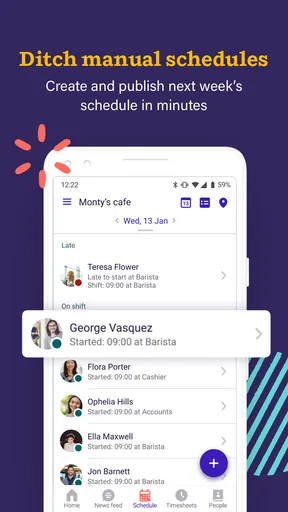
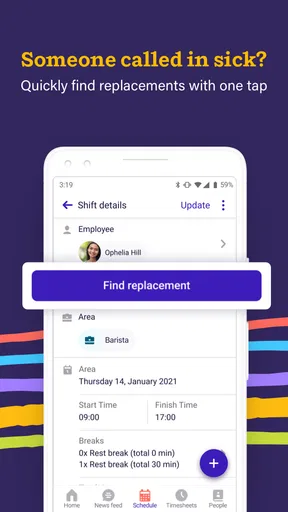
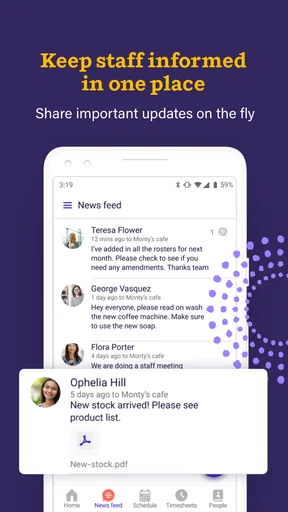
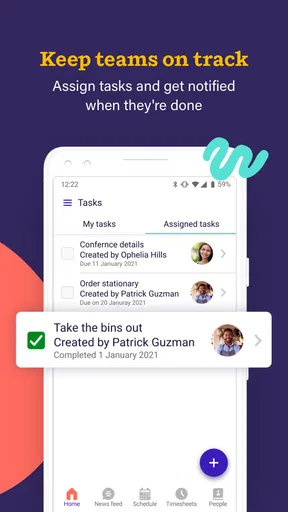
Our Review of Deputy: Employee Scheduling
 Analysis by Appyee
Managing shifts from a phone sounds simple until a last-minute absence, a changed availability window, or a busy manager turns a tidy schedule into a chain of messages. After spending time with Deputy: Employee Scheduling, I found that its real value is not just putting names into time slots. It gives a business-focused way to organize work schedules, communicate changes, and keep the daily planning process in one place instead of scattering it across paper notes, spreadsheets, and group chats.
This is a free business app from Deputy.com, aimed at workplaces where several people need to coordinate hours rather than at individuals planning their personal calendars. It has earned a 4.7 average from around 19 thousand ratings and has passed the million-install mark, which fits my impression that it is designed for practical, recurring workplace use rather than occasional personal planning.
I would recommend it most readily to managers of restaurants, shops, salons, care teams, hospitality businesses, and other organizations where coverage changes often. I would be less enthusiastic for a very small team that only needs a shared calendar, or for a company looking for a complete payroll and operations suite inside one lightweight mobile download. The scheduling focus is its strength, but it also defines its limits.
Where the app depends on a reliable connection
The first thing I noticed is that a scheduling app is only as useful as the freshness of the information it displays. When a manager publishes a shift, an employee checks a start time, or someone responds to a change, the phone needs to exchange current information with the service. That makes connectivity part of the experience, not a minor technical detail.
In a normal connected setting, the workflow feels straightforward. I can imagine a supervisor checking the week, adjusting a shift, and expecting the affected employee to see the new arrangement from their own device. An employee can use the app as a reference point instead of searching through an old message thread. That distinction matters because a schedule is not merely a list of events; it is a shared version of the truth for a team.
The practical risk appears during transitions. A manager might edit a roster while moving between locations, or an employee might open the app in a basement, stockroom, rural area, or crowded building with inconsistent reception. If the latest change has not reached the phone, confidence in the displayed schedule becomes weaker. I would not treat a screen viewed during poor connectivity as proof that no newer change exists.
That does not make the app unsuitable for mobile work. It means managers should build a simple habit around important changes: make schedule edits when the connection is stable, allow the app time to refresh, and avoid assuming that a change is visible to everyone immediately just because it was entered on one device. For a shift beginning soon, I would also use the team’s established communication method when a change is especially important.
This is one of the less obvious trade-offs of digital scheduling. A paper board is instantly visible to people standing beside it, but it becomes useless for anyone away from the workplace and can be difficult to audit after repeated changes. A phone-based system reaches people wherever they are, yet it depends more heavily on synchronized access. The better choice depends on where the team spends its time and how often the schedule changes.
What happens during a busy scheduling day
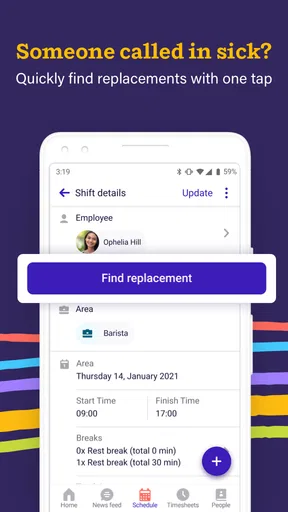
A realistic example would be a small café preparing for a weekend rush. One employee calls out, another person is available later than usual, and the manager needs to adjust coverage without rebuilding the entire week. A dedicated scheduling tool is more appropriate here than a general calendar because the problem is not simply “add an event.” The manager needs to think in terms of people, coverage, and changes to a shared work plan.
In that situation, the phone is useful because the manager may not be sitting at a desk. A quick check between tasks is more realistic than opening a spreadsheet on a computer in the back office. The employee also benefits from having a work-specific place to check the arrangement rather than relying on memory or a buried conversation.
However, I would not make the app the only emergency channel for a critical same-day change. If the network is unstable, a notification is overlooked, or someone has not opened the app, the schedule may be correct in the system but ineffective in practice. My preferred workflow would be to update the official schedule first, then directly alert the affected person when timing matters. That keeps the roster authoritative without pretending that software replaces human confirmation.
Using it on the move
The mobile format suits the people who actually need scheduling information away from a desk. Employees can check work details while commuting, managers can review coverage from the sales floor, and supervisors can make decisions without returning to a computer. That convenience is especially valuable in workplaces where the person responsible for staffing is also serving customers or handling operations.
Still, a small screen changes how carefully I would use the app. Reviewing a whole team’s schedule, comparing several days, or making many edits in succession is more demanding on a phone than on a larger display. Mobile is excellent for checking, confirming, and making focused adjustments. It is less comfortable as the only place to design a complicated roster from scratch.
My advice is to separate planning from maintenance. If the schedule involves many employees, different roles, or frequent overlapping shifts, I would do the most detailed preparation in the environment that gives the clearest overview, then use the phone for quick corrections and verification. If the team is small and the changes are occasional, the mobile experience may be enough on its own.
Another useful habit is to check the schedule before entering a low-signal location rather than waiting until the last minute. A worker heading into a building with unreliable reception can review the upcoming shift while connected and avoid discovering a potential problem at the entrance. I would still regard that as preparation, not as evidence of guaranteed offline operation. The app’s connected nature should shape how people plan around it.
Notifications and attention also deserve practical thought. A schedule can change without the employee noticing at the exact moment it happens, particularly during a shift or when the phone is muted. For that reason, I would encourage teams to define what counts as confirmation for urgent changes. The app can hold the official arrangement, while a direct message or call handles situations where silence could create a staffing gap.
Handling errors, missed changes, and recovery
No scheduling system removes the possibility of mistakes. Someone can choose the wrong day, edit the wrong person, overlook a conflict, or assume that a change was seen. The important question is how easily a team can recover without losing track of what should happen next.
With this app, I would treat every significant edit as something to verify, especially when it affects the next shift. After changing coverage, the manager should review the resulting schedule rather than immediately moving on. The employee should also check the updated arrangement from their side when possible. That two-step habit catches simple errors before they become a missed opening, an uncovered station, or an unnecessary trip to work.
Connectivity makes recovery more complicated. If a manager edits while the connection is unstable, the safest approach is not to keep making repeated changes in the hope that one eventually works. I would wait for a stable connection, reopen or refresh the relevant schedule, and confirm the final state. Repeated tapping can create uncertainty about which version is current, particularly when several people are making adjustments.
When an employee reports a discrepancy, the manager should compare the app’s current schedule with the message or conversation that caused confusion. The goal is to establish one final arrangement, not to debate which old version someone remembers. Once the correct shift is clear, I would communicate it plainly and ask for a direct acknowledgment if the timing is close.
This is where a dedicated scheduling service has an advantage over a basic group chat. Chats are flexible, but they quickly become difficult to interpret when people say “I can cover,” “I thought that was next week,” or “the time changed again.” A schedule-focused app gives the team a central place to consult. The trade-off is that everyone has to use that central place consistently; otherwise, the business ends up with two competing records.
I would also be cautious about treating the app as a historical investigation tool unless the organization already has a clear process for reviewing changes. The safest everyday practice is simple: make one deliberate update, verify it, and use direct confirmation for urgent exceptions. That reduces confusion more effectively than trying to repair a tangled sequence of edits afterward.
Keeping mobile use focused and data-conscious
Because this is a work scheduling app, I would use it with a clear boundary between necessary information and unnecessary phone activity. Checking an upcoming shift, reviewing a change, or handling a staffing issue is a focused task. Leaving the app open while moving through areas with weak reception or repeatedly refreshing a schedule is less useful and may consume more connectivity than the task requires.
A practical routine is to review the next work period when connected, note any important changes, and close the app once the information is clear. Managers who oversee several locations or a large number of workers should be especially deliberate about when they perform broad schedule reviews. A larger planning session on a dependable connection is more sensible than constant mobile checking throughout the day.
I would also avoid using screenshots as the permanent substitute for the live schedule. A screenshot can help someone remember a shift while traveling, but it becomes stale as soon as a manager changes the roster. The safest use is as a temporary reference, followed by a fresh check when the employee has a reliable connection. This small distinction prevents an old image from becoming an accidental promise.
Teams should agree on what information belongs in the scheduling workflow and what belongs elsewhere. A shift time and coverage change are central to the app’s purpose. Sensitive personal discussion, complicated incident details, or unrelated workplace conversations may be better handled through the organization’s established channels. Keeping the schedule focused makes it easier to find the information that matters and reduces the temptation to turn one tool into every kind of communication system.
For employees with limited mobile data, the most sensible approach is to use stable workplace or home connectivity for regular schedule review when available, then reserve mobile access for necessary checks. I would not make assumptions about how the app behaves without a network, so I would test the team’s actual routine before promising that a person can rely on it in a dead zone. That trial should include opening a previously viewed schedule, receiving a change, and reconnecting afterward to see how the team’s process behaves.
Who should choose it and who should look elsewhere
The app is a strong fit for a manager who needs a shared scheduling center and wants employees to consult the same work plan from their phones. It is particularly appealing when shifts change often enough that paper and spreadsheets create duplicate versions, but the organization still wants a focused scheduling tool rather than a sprawling business platform.
It may also suit a team that has outgrown a group chat. Chat is excellent for conversation but poor at preserving a clean roster. A spreadsheet offers flexibility and can be familiar to managers, yet it usually requires more manual upkeep and is less natural for employees checking a shift from a phone. A general calendar is fine for appointments, but it does not naturally reflect the people-centered nature of staff coverage.
I would hesitate if the business has very complicated operational requirements and expects scheduling to be only one part of a broader system. The app’s identity is clearly centered on work schedules, so a company needing deep inventory, accounting, project management, or specialized workforce controls may prefer a more comprehensive platform, even if that means accepting a heavier interface.
I would also hesitate for a team that refuses to adopt a single source of truth. No app can fix a workplace where managers edit one schedule, employees follow a separate chat, and supervisors rely on a printed sheet that nobody updates. Before installing it, the business should decide who is allowed to make changes, how urgent edits are confirmed, and what employees should do when the phone shows something different from a verbal instruction.
For a small operation with only a few recurring shifts, a shared calendar may be cheaper in effort even when the scheduling app itself is free. The free entry point is helpful, but the presence of in-app purchases ranging from under a dollar to nearly one hundred dollars per item means managers should examine the organization’s expected usage before assuming every need will remain cost-free. I would begin with the basic workflow, then assess whether any paid additions genuinely solve a problem rather than adding complexity.
Version, access, and the everyday learning curve
The app has been available since August 21, 2013, and the current version is 26.33.0. That long presence suggests a product built around an established business use case rather than a short-lived experiment. It supports Android 7.0 and later, which is useful for workplaces that keep older phones in service, although each company should still test the app on the actual devices employees carry.
Its Everyone content rating makes the app broadly accessible from an age-classification perspective, but workplace suitability is still about roles and responsibilities. A manager needs to understand the consequences of publishing a change, while an employee mainly needs a dependable way to check assigned work. I would introduce the app with a short team exercise: have one person create or adjust a sample shift, another check it, and both practice what to do if the connection drops during the process.
That training is more valuable than a long explanation of every screen. The key lessons are operational: where the official schedule lives, how changes are confirmed, when to contact a manager directly, and how to recheck after reconnecting. Once those rules are clear, the phone interface becomes much less intimidating because employees know what the app is responsible for and what still requires human judgment.
My overall impression is that Deputy.com has made a practical choice by focusing this app on scheduling rather than trying to turn a phone into an entire office. The result is most convincing when a team has real shift complexity but wants a manageable mobile reference point. It is less convincing when the organization needs a full business suite or expects scheduling to work independently of connectivity and team discipline.
My connectivity verdict
I see this as a useful connected scheduling tool, not a magic replacement for communication. Its mobile format helps managers and employees stay aligned outside a desk-based office, and its dedicated purpose gives it an advantage over scattered messages and manually maintained calendars. The strongest workflow is one where the app holds the official schedule, managers make deliberate edits on a stable connection, and people confirm urgent changes through an agreed backup channel.
The main limitation is also clear: when reception is unreliable or people do not check for updates, a correct schedule can still fail to reach the person who needs it. That is not a reason to reject the app, but it is a reason to establish sensible habits before relying on it for busy operations. I would test it in the actual workplace, especially in low-signal areas, and decide how the team handles emergencies before making it central to staffing.
My recommendation is positive for shift-based teams that need one shared schedule and are willing to treat connectivity as part of the workflow. I would choose it over a group chat when clarity matters, and over a basic calendar when multiple people and changing coverage are involved. I would skip it only when the team is too small to benefit from dedicated scheduling, when a broader workforce platform is required, or when the business cannot commit to checking and confirming updates.
For those who do adopt it, the best result will come from using the app as the dependable record, not as the only line of communication. That balance captures what I like about Deputy: Employee Scheduling: it brings order to a messy daily task while still leaving room for the practical judgment that real workplaces need.
Verdict
Strengths of Deputy: Employee Scheduling
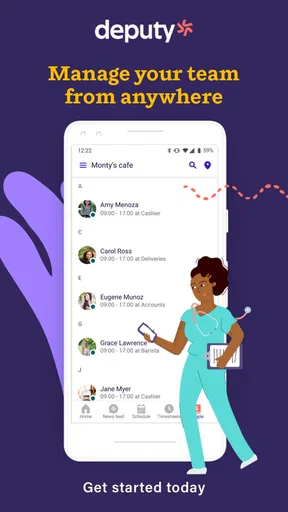
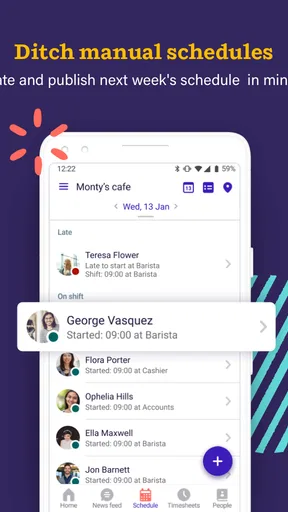
- Quickly view shifts, schedules, and workplace updates in one app.
- Shift reminders help reduce missed work and scheduling confusion.
- Employees can request leave or swap shifts from their phones.
- Managers can track attendance and review timesheets more efficiently.
- Useful communication tools keep teams informed about schedule changes.
Limitations of Deputy: Employee Scheduling
- Some features require a paid Deputy account managed by the employer.
- The interface can feel crowded when handling multiple jobs or locations.
- Frequent notifications may become distracting without careful customization.
- Timesheet and GPS features may raise privacy concerns for some employees.
- Performance can depend on the employer’s setup and internet connection.
Similar Picks in This Category
View All
LinkedIn: Community & Network
LinkedIn3.8

Zoom Workplace
zoom.com4.1

Microsoft Teams
Microsoft Corporation4.6

Meta Business Suite
Meta Platforms, Inc.4.6

Webex Meetings
Cisco Systems, Inc.4.5

TeamViewer Remote Control
TeamViewer4.4
Frequently Asked Questions
What is Deputy: Employee Scheduling used for?
Deputy: Employee Scheduling is designed to help businesses organize employee shifts, manage availability, track attendance, and communicate schedule changes. After reviewing the app, its main strength is bringing scheduling and workforce-management tasks into one place. Managers can create rosters, fill open shifts, and monitor staffing, while employees can check upcoming work, request changes, and stay informed from their mobile device.
Can employees use Deputy to view and manage their schedules?
Yes. Employees can generally use Deputy to view published shifts, review work details, indicate availability, and submit requests such as time off or shift changes, depending on the permissions configured by their employer. The app is most useful when the business actively uses Deputy for communication and approvals. Some features may not appear until an employee has been invited and assigned to the correct workplace or team.
Does Deputy include time tracking and attendance features?
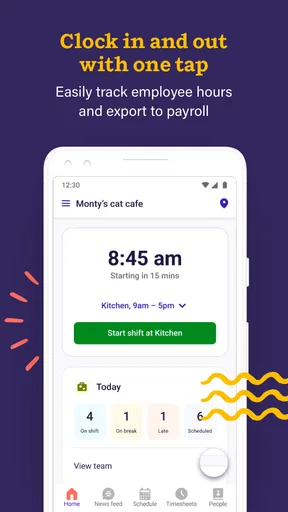
Deputy offers workforce time-tracking tools in addition to scheduling. Depending on the company’s subscription and setup, employees may be able to clock in and out, while managers can review timesheets, attendance information, breaks, and possible scheduling discrepancies. Businesses should configure location, device, and approval settings carefully, because available tracking options and privacy requirements can vary by workplace and local employment regulations.
Is Deputy: Employee Scheduling free to download and use?
The app can typically be downloaded at no initial cost, but access to Deputy’s full scheduling and workforce-management features is generally connected to a business account or subscription. Employees usually do not choose the plan themselves; their employer controls access and billing. Before downloading, managers should check current pricing, trial conditions, user limits, and whether features such as payroll integrations or advanced reporting require an additional plan.
What should I know about privacy, permissions, and device compatibility?
Deputy may request permissions related to notifications, location, camera, calendar, or other device functions, depending on how the employer uses the service. Location access may be relevant to attendance or workplace verification, but it should be explained through the company’s policies. The app is intended for modern Android and iOS devices, although performance can depend on operating-system version, internet connection, and the employer’s account configuration.
